

Online Safety
Federation Beliefs
The staff at the Federation believe that children should be taught to use the internet safely, allowing them to experience the benefits that its use can provide.
Whilst at school, the children will be taught the following in class or age-appropriate assemblies:
- What to do to stay safe online.
- What they should do if they feel unsafe online.
- At school, your children learn behind the schools’ protective filtering system that restricts what children can access. Most computers your children will use do not have such a rigorous filtering system (i.e. at home). Thus, we need your help to ensure they stay safe online.
Online Safety Policy

|
Online Safety Policy Summer 2026 - Summer 2027 | [pdf 713KB] |

|




National College: Keeping your child safe online
Please click on this link to access parent guides to support you with keeping your child safe online.
'Wake Up Wednesday': Guidance and Support for Parents/ Carers
What Do Parents/ Carers Need to Know? Online Safety and Device Useage. How to keep your child safe online.
|
|
12 Ways to Champion Equality Online | [pdf 1MB] |
|
|
|
Age Inappropriate Content | [pdf 2MB] |
|
|
|
AI Solutions | [pdf 2MB] |
|
|
|
AI Virtual Friends | [pdf 2MB] |
|
|
|
Amazon Alexa | [pdf 1MB] |
|
|
|
Amazon Fire Tablets | [pdf 3MB] |
|
|
|
Amino | [pdf 3MB] |
|
|
|
Among Us | [pdf 2MB] |
|
|
|
Anime | [pdf 2MB] |
|
|
|
BeReal | [pdf 2MB] |
|
|
|
Boundaries Around Gaming | [pdf 2MB] |
|
|
|
Brighten Somebody's Day Online | [pdf 1MB] |
|
|
|
Building Cyber Resilience at Home | [pdf 4MB] |
|
|
|
Call of Duty | [pdf 3MB] |
|
|
|
Call of Duty Cold War | [pdf 2MB] |
|
|
|
Call of Duty Modern Warfare | [pdf 2MB] |
|
|
|
Call of Duty Modern Warfare II | [pdf 3MB] |
|
|
|
Call of Duty Warzone | [pdf 5MB] |
|
|
|
Clickbait | [pdf 1MB] |
|
|
|
Cross Platform Consent Sharing | [pdf 2MB] |
|
|
|
Data Backups and Storage | [pdf 3MB] |
|
|
|
Disney + | [pdf 2MB] |
|
|
|
EA Sports FC 24 | [pdf 3MB] |
|
|
|
Echo Chambers | [pdf 2MB] |
|
|
|
[pdf 2MB] |
|
|
|
|
Facebook Messenger | [pdf 2MB] |
|
|
|
Fair Play and Friendly Competition | [pdf 2MB] |
|
|
|
FIFA 23 | [pdf 2MB] |
|
|
|
Final Fantasy XIV 18.09.24 | [pdf 2MB] |
|
|
|
Five Nights at Freddy's | [pdf 4MB] |
|
|
|
Fortnite | [pdf 2MB] |
|
|
|
Free Speech V Hate Speech | [pdf 2MB] |
|
|
|
Gambling | [pdf 2MB] |
|
|
|
Google Chromebook | [pdf 2MB] |
|
|
|
Group Chats | [pdf 2MB] |
|
|
|
Guide to Avoiding Becoming a Screen Zombie | [pdf 1MB] |
|
|
|
Healthy Friendships | [pdf 2MB] |
|
|
|
Helldivers II | [pdf 2MB] |
|
|
|
HiPal | [pdf 2MB] |
|
|
|
How to Combat Online Bullying | [pdf 2MB] |
|
|
|
In Game Chat | [pdf 699KB] |
|
|
|
Influencers | [pdf 2MB] |
|
|
|
[pdf 3MB] |
|
|
|
|
IPads | [pdf 2MB] |
|
|
|
Keeping Children Safe Online During School Holidays | [pdf 1MB] |
|
|
|
Lego Fortnite | [pdf 2MB] |
|
|
|
Live Streaming | [pdf 2MB] |
|
|
|
Location Tracking | [pdf 4MB] |
|
|
|
Loneliness Online. What Causes it and Ways to Feel Better | [pdf 1MB] |
|
|
|
Looking After Your Wellbeing Online | [pdf 2MB] |
|
|
|
Loot Boxes | [pdf 3MB] |
|
|
|
Managing Device Stress and Anxiety | [pdf 2MB] |
|
|
|
Managing Screen Time | [pdf 2MB] |
|
|
|
Microtransactions | [pdf 3MB] |
|
|
|
Money Muling | [pdf 2MB] |
|
|
|
Monkey | [pdf 2MB] |
|
|
|
Music Streaming Apps and Sites | [pdf 8MB] |
|
|
|
My LOL | [pdf 2MB] |
|
|
|
NGL | [pdf 2MB] |
|
|
|
OFCOM Media Report | [pdf 2MB] |
|
|
|
OMETV | [pdf 2MB] |
|
|
|
Online Content | [pdf 4MB] |
|
|
|
Online Content Conversation Starters for Parents and Carers | [pdf 880KB] |
|
|
|
Online Dating Platforms and Relationships | [pdf 1MB] |
|
|
|
Online Financail Scams and Exploitation | [pdf 3MB] |
|
|
|
Online Safety Act | [pdf 3MB] |
|
|
|
Online Trolling | [pdf 2MB] |
|
|
|
Open Discussions About Digital Lives | [pdf 2MB] |
|
|
|
Overwatch 2 | [pdf 2MB] |
|
|
|
Palwrold | [pdf 2MB] |
|
|
|
Parent Controls to Limit Age Appropriate Content on Iphones | [pdf 920KB] |
|
|
|
Parent Controls to Limit Age Inappropriate Content on Android Phones | [pdf 608KB] |
|
|
|
Persuasive Design | [pdf 2MB] |
|
|
|
Pop Ups | [pdf 2MB] |
|
|
|
QR Code Scams | [pdf 2MB] |
|
|
|
[pdf 3MB] |
|
|
|
|
Roblox | [pdf 2MB] |
|
|
|
Rumble | [pdf 2MB] |
|
|
|
Safe and Healthy Habits Online | [pdf 3MB] |
|
|
|
Screen Addiction | [pdf 1MB] |
|
|
|
Screen Grabs | [pdf 8MB] |
|
|
|
Sendit | [pdf 2MB] |
|
|
|
Setting Up Controls for Android APPs | [pdf 4MB] |
|
|
|
Setting Up Games APPs and Software | [pdf 4MB] |
|
|
|
Share Kindness Online | [pdf 2MB] |
|
|
|
Sharing Photographs Online | [pdf 7MB] |
|
|
|
Shopping Platforms | [pdf 2MB] |
|
|
|
SMART TVs | [pdf 2MB] |
|
|
|
Smart Watches | [pdf 3MB] |
|
|
|
Smartphone Tips For Young People | [pdf 2MB] |
|
|
|
Snapchat | [pdf 2MB] |
|
|
|
Social Media Safety Tips | [pdf 1MB] |
|
|
|
Spotify | [pdf 3MB] |
|
|
|
Spotting Ads on Social Media | [pdf 1MB] |
|
|
|
Stay Safe on New Devices | [pdf 2MB] |
|
|
|
Staying Safe Online | [pdf 4MB] |
|
|
|
Staying Safe Online During the Summer Holidays | [pdf 2MB] |
|
|
|
Staying Safe Online in Summer | [pdf 3MB] |
|
|
|
Steam | [pdf 2MB] |
|
|
|
Stronger Passwords | [pdf 3MB] |
|
|
|
Supporting Children to Deal With Upsetting Content | [pdf 2MB] |
|
|
|
Tekken 8 | [pdf 2MB] |
|
|
|
Telegram | [pdf 3MB] |
|
|
|
The Sharing of Intimate Images | [pdf 2MB] |
|
|
|
Threads | [pdf 3MB] |
|
|
|
TikTok | [pdf 3MB] |
|
|
|
Tips for Creating Family Rules for Using Devices | [pdf 2MB] |
|
|
|
Tips for Using and Reviewing Parental Controls | [pdf 2MB] |
|
|
|
Township | [pdf 2MB] |
|
|
|
WAPP | [pdf 2MB] |
|
|
|
Ways Gaming Can Support Positive Outcomes | [pdf 3MB] |
|
|
|
What Parents and Carers Need to Know About Screen Grabs | [pdf 3MB] |
|
|
|
[pdf 2MB] |
|
|
|
|
Wizz | [pdf 2MB] |
|
|
|
World of Warcraft | [pdf 3MB] |
|
|
|
X | [pdf 2MB] |
|
|
|
Youtube | [pdf 2MB] |
|
|
|
Youtube Kids | [pdf 2MB] |
|
Staying Safe Online
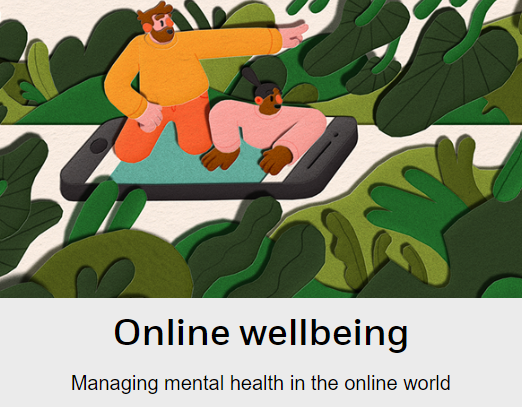
Social Media and Mental Health - Advice for parents
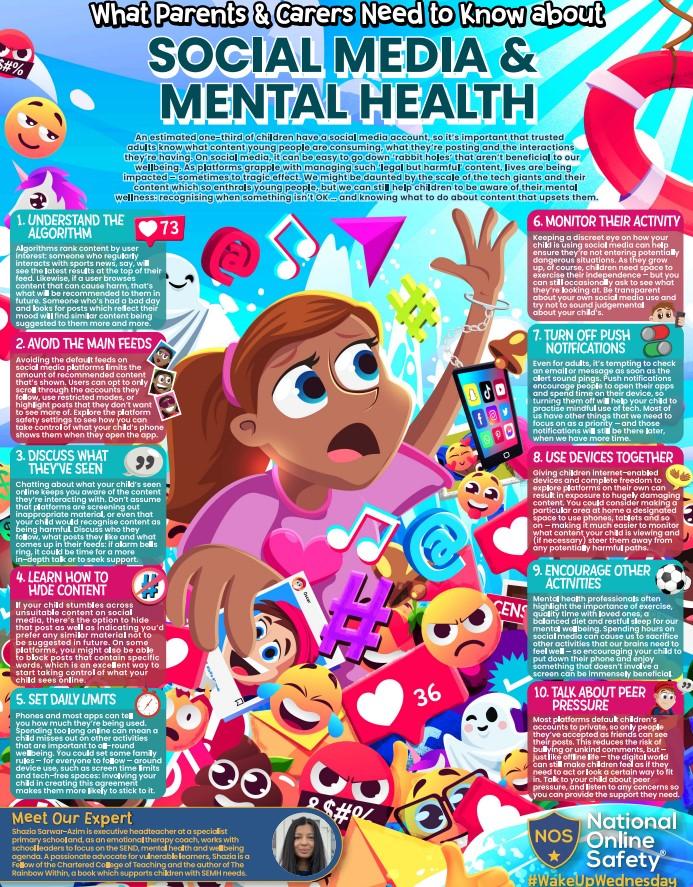
An estimated one-third of children have a social media account, so it’s important that trusted adults know what content young people are consuming, what they’re posting and the interactions they’re having. On social media, it can be easy to go down a rabbit hole that isn’t beneficial to our wellbeing. As platforms grapple with managing ‘legal but harmful’ content, lives are being impacted – sometimes to tragic effect. We might be daunted by the scale of the tech giants and their content which enthrals young people, but we can still help children to be mindful of their mental wellness: recognising when something isn’t OK … and knowing what to do about content that upsets them.
In the guide below, you'll find tips such as how to hide content, setting daily limits and discussing what children have seen online.
|
|
Social Media and Mental Health | [pdf 2MB] |
|
What can I do at home?
Talk to them about what they are going on when they are online and the potential dangers that those sites may have, remind them what they should do if they see or hear anything that they do not like or makes them feel uncomfortable.
Keep an eye on what they do online by allowing your child on the internet somewhere where you can see what they are looking at.
Make sure that you have the relevant settings set on the device that they are using to go online.
Internet Matters have produced their own app, which is designed to help parents learn together with their child about key online safety issues.
The app is available to download for android devices here and for iOS devices here
Below are a series of links to a variety of sites that you can look at either on your own or with your child. The titles indicate the content of each page.
Apex Legends: everything you need to know about the battle royale game
How to be SMART using the Internet
Dangers lurking on the Internet
How to search safely on the Internet
Think You Know - a comprehensive site
Learn how to spot dangers and stay safe online